Job Aid: RECR Instructions for Staff

Beyond being a university requirement, RECR training is a federal requirement. All graduate students must complete RECR requirements.

Negative service indicators (holds) will be applied to students' records if they fail to complete their yearly RECR requirements. Units should monitor their students' training closely to ensure that annual training is being completed. 

Master's Plan A, Plan B, and Graduate Professional students must complete all their RECR requirements prior to graduation.

Doctoral students must complete year 1, year 2, and the 6 hours of discussion-based (instructor led) RECR training before they pass their comprehensive examinations.

Doctoral students must also complete 3 hours of refresher training each year until graduation starting in academic year 3.

  • The Graduate School’s Basic RCR requirements may be found here.
  • All Master’s, Doctoral and Professional Graduate Students must complete at least the basic RECR requirements. Units/Colleges may require more than the basic requirements. Students should check with their unit/college to determine if requirements beyond the Graduate School’s Basic RECR training must be completed.
    • Master’s Plan B and Graduate Professional Students must complete the following:
      • Year 1 CITI modules (4 specific modules)
      • 6 hours of Discussion-Based (Instructor Led) Training
    • Master’s Plan A Graduate Students must complete the following:
      • Year 1 CITI modules (4 specific modules)
      • Year 2 CITI modules (choose 3 of 6 specific modules)
      • 6 hours of Discussion-Based (Instructor Led) Training
    • Doctoral Graduate Students must complete the following:
      • Year 1 CITI modules (4 specific modules)
      • Year 2 CITI modules (choose 3 of 6 specific modules)
      • 6 hours of Discussion-Based (Instructor Led) Training
      • 3 hours of Refresher Training in every year beginning at Year 3 until the student graduates
  •  In the first academic year of enrollment in a graduate degree program, all graduate students should complete the Year 1 CITI modules.
    • Information about creating a CITI account and completing training may be found here.
    • Students are to only use their MSU email when creating their CITI account. Training will not connect to Ability and completed modules will not show on the student’s RCR page if a non-MSU email is used. See here for information about Ability.
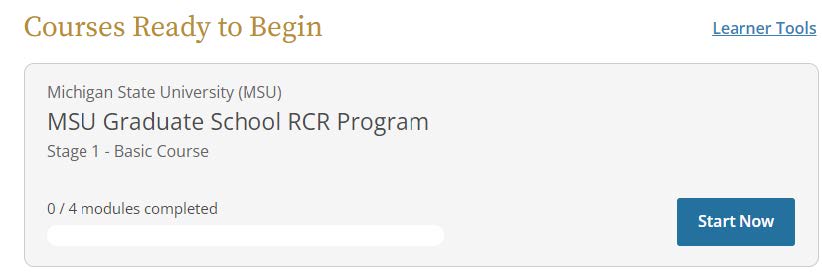
    • Students are to complete the MSU Graduate School RCR Program modules.
      • A screenshot of the home page of the RECR Program module.
    • Courses taken prior to the student’s first academic year in their graduate program will not 
      count.
    • Students can take the courses late (after the first year), but it is highly recommended that the 
      modules are completed in Academic Year 1.
    • Once CITI modules are complete, they will be listed in the Ability Course Management System. Then, the module information will transfer from Ability to the Data Warehouse. From the Data Warehouse, the course information will transfer to the student’s RCR page in SIS. This process may take up to two weeks to complete.
  • In the second academic year of enrollment in their graduate degree program, Master’s Plan A and Doctoral students should complete the Year 2 CITI modules.
    • The Year 2 CITI modules are not an option for students to choose until the Year 1 CITI modules have been completed.
    • The Year 2 CITI modules are denoted as being “Supplemental” or “Optional” in the CITI system. 
    • The Year 2 CITI modules can be taken late (after the second year), but students are highly encouraged to complete them in Academic Year 2.
    • There is a choice of 6 CITI modules for Year 2. Students only need to complete 3 of them to fulfill Year 2’s requirements. Doctoral students may take the remaining 3 Year 2 CITI modules in a refresher year to go toward fulfillment of refresher year requirements.
    • Students may find information about the Year 2 CITI modules here.
  • Discussion-Based (Instructor Led) RECR training may be fulfilled by participating in and completing any of the following:
    • Department/College Workshops, brown-bag luncheons, group discussions covering RECR related topics. If there is no course already created in Ability that students are enrolled in, a group event spreadsheet needs to be filled out by staff (not the student) and submitted to recr@msu.edu for upload to Ability after completion.
    • Graduate School RECR Workshop Series
    • Academic courses that cover RECR related topics. The group completion spreadsheet needs to be filled out by staff (not the student) and submitted to recr@msu.edu for upload to Ability. This type of course is listed as RCR-5000-ILT.
      • Note:  if a student has multiple takings of RCR-5000-ILT, each taking will have a different course number on the Track RCR page once it has been uploaded to SIS. (i.e.; first taking=RCR-5000-ILT, second taking=RCR-5001-ILT, third taking=RCR-5002-ILT, fourth taking=RCR-5003-ILT, fifth taking=RCR-5004-ILT, etc.)
    •  Other similar types of courses that cover RECR topics. Please reach out to gradsis@grd.msu.edu if you have questions about whether a certain course/training may count for RECR Discussion-Based Training.
    • Note: It can take up to two weeks for uploaded training to appear on a student’s RCR page and staff Track RCR page. Students may begin fulfilling the 6 hours of Discussion-Based (Instructor Led) Training in academic Year 1.
  • Doctoral Student Refresher Year Training (3 hours each year) beginning in Academic Year 3 may be fulfilled by completing any of the following:
    • CITI modules not previously taken to fulfill Year 1 or Year 2 requirements or another refresher 
      year’s requirements
    •  Department/College RCR Workshops not previously taken
    •  Graduate School RCR workshops not previously taken
    •  One-on-one discussions between the student and their advisor
    •  Other RCR related courses (non-CITI modules, Academic courses, etc.)
    • Note: Refresher Training completed late will back-fill to complete an open Refresher Year, but courses may not be taken early to fill future Refresher Years. For example, students should not take 6 hours of refresher training in Academic Year 3 expecting them to fulfill Year 3 and Year 4. Three of the hours will fulfill Year 3 and the rest will move to the Additional Training section.)
  • REMINDER: Advisor one-on-one RECR training is only for Doctoral Students and is only for fulfillment of refresher years’ training requirements (Academic Year 3 and beyond). This type of training may not be used to fulfill the 6 hours of Discussion-Based (Instructor Led) Training.
  • Ph.D. Students enter the Advisor Refresher Training (One-on-One Discussions) with their advisor. It is recommended that students be responsible for entering their own one-on-one training with their advisor. Once a student has entered the training with their advisor, the advisor will receive an email informing them they need to verify or reject the training. The advisor may verify/reject the training themselves or department staff with the “RECR Update-in-person discussion” role may verify/deny on the advisor’s behalf.
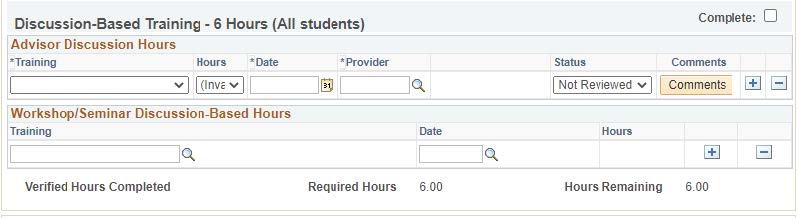
    • The discussion-based training screen showing the status as "Not Reviewed."
  • Training entered will remain in the Discussion-Based Training area in the Advisor Discussion hours section until the training has been verified and the page has been refreshed. Rejected training will remain in this section even after the decision has been saved and the page has been refreshed.
    • The discussion-based training screen showing the status as "Verified."
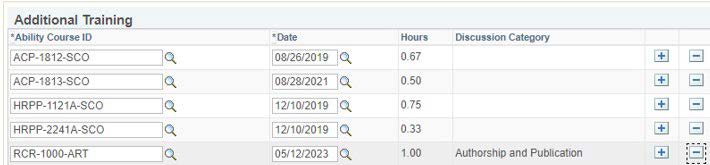
  • After verifying training, click Save at the bottom of the page and then refresh the page. All one-on-one discussions with an advisor will be listed as RCR-1000-ART (with a discussion category (topic)) in the RCR page once verified.
  • If training is verified, it will move into the appropriate refresher year (based on the date the training was completed.) If the training was completed before a refresher year (before Year 3), it will fall into the Additional Training section at the bottom of the RECR page. If a training applies to a refresher year that is already fulfilled, it will move to the Additional Training section.
    • A screenshot of the Additional Training section.
  •  Log-in to https://student.msu.edu
  • Click on the Graduate and Professional tile
  • Click on Track RECR
    • A screenshot of the Track RECR Button.
  • Look up a student.
  • The following sections are on the Track RECR page:
    • Year 1 Training—Four CITI Modules (All students)
    • Year 2 Training—Three CITI Modules (Master’s Plan A and Doctoral Students)
    • Discussion-Based Training—6 hours (All students)
      • There are two components in this section (Advisor Discussion Hours and Workshop/Seminar Discussion-Based Hours)
      • A screenshot of the two components of discussion-based training.
    • Annual Refresher Training—3 hours per year until the student graduates
    • Additional Training
      • This is training that does not apply to any other section on the RCR page
  • If a student completes one graduate degree and begins another one later (i.e., completed a Master’s degree and then started a Ph.D. later) the student should have a new RECR page created for the new degree. The job aid that discusses this process may be found here.
  • RECR Training on the “old” RECR page completed on or after the start date of the “new” page will move to the new page and fall into whatever section is appropriate.
  • If Year 1 and Year 2 CITI modules were taken within 5 years of the start of the new degree they do not need to be retaken for the new degree. Someone at the unit/college level with the RECR correct role can mark Year 1 and Year 2 complete and add a comment on the new RECR page as to why the training does not need to be repeated for the new degree.
  • Refresher year requirements still begin in academic Year 3 on the new RECR page for the new degree.
  • Discussion-based (Instructor Led) training (6 hours) must be completed for each degree.
  • When a new RECR page is added for the new degree, the “old” page becomes locked and no changes can be made to the old page.
  • Staff with the “RECR Correct” role can move training, complete sections/years and add comments. 
    These actions should be performed sparingly.
    •  No CITI modules should be moved into the 6 hours of Workshop/Discussion Based (Instructor Led) training section. CITI modules are Web Based Training, not Instructor Led.
    • The only courses that may count for Workshop/Discussion Based (Instructor Led) training must end with the -ILT (Instructor Led Training) or -ILTVC (Instructor Led Training Virtual Course) suffixes.
    • If training has been previously recorded in a shadow or legacy system, you may not add comments and complete years in SIS. All training must be in Ability with the exception of One-on-One Advisor training.
    • One-on-One training with advisors does not count toward the 6 hours of discussion based training, so do not move those courses into the Workshop/Discussion Based section.
    • Staff must pay attention to the dates courses were taken to determine what year a course should fall into if courses are being moved.
  • Due to the RECR functional update in August 2023, courses manually moved prior to August 9, 2023, now appear on the page according to course completion date. Previously satisfied sections or requirements may no longer be complete. Staff with the RECR Correct role can move courses and complete sections if needed. It is recommended that all programs review their students’ RECR pages regularly. Please contact gradsis@grd.msu.edu with any questions.
  • All RECR records must be captured in the RECR page in SIS. If training is not recorded in SIS it cannot be used to fulfill RECR requirements.
  • The training year is August 16th through August 15th of the next calendar year.
  • Students may not retake any courses/training they completed previously that fulfilled some other requirement (i.e., Year 1, Year 2, Discussion Based, etc.). Courses retaken will automatically fall into the Additional Training section.
  • Training completed to fulfill the 6 hours of Discussion-Based (Instructor Led) section does not double-count as refresher year training if completed in Academic Year 3 or beyond.
  • RCR-5000-ILT (Academic Course RECR training): wait until the entire academic course and all training sessions are completed and submit 1 spreadsheet that encompasses all of the hours instead of submitting several spreadsheets with small durations of training. (i.e., If there were 4 sessions that each counted for 0.5 hours, don’t submit 4 separate spreadsheets. Submit only one spreadsheet with 2 hours when the course is complete.)
  • Students may wish to complete more RECR training than is necessary for their own personal 
    enrichment, but they only need to complete the Graduate School’s basic requirements and any 
    other specific requirements their unit or college may require.
  • The Graduate School will apply Negative Service Indicators (Holds) for students who do not fulfill 
    their annual RECR requirements.
  • Ensure that students are completing their annual RECR requirements.
  • Ensure that students are aware of the required training and how they should complete the training. This should be part of your annual student orientation.
  • There are queries in the Graduate Reporting Center regarding RCR to help you determine which students have completed their requirements and which students have not. The queries are in the Warning Reports folder.
    • RECR CITI Year 1 Incomplete: MSU_GR_RCR_CITI_Y1
    • RECR CITI Year 2 Incomplete: MSU_GR_RCR_CITI_Y2
    • RECR Discussion Hours Inc: MSU_GR_RCR_SIXHOURS
    • RECR Annual Refresher Incomp: MSU_GR_RCR_REFRESHER_NOTCMPLT (note: this 
      query returns results for every refresher year that a student has not completed, so you 
      will see multiple rows for many students)
  • If students are taking Academic courses or other courses not in Ability that count for RECR training it is up to the unit to complete the Ability upload spreadsheet and email it to recr@msu.edu.
  • Make sure all RECR training is recorded in SIS. Recording training in shadow systems and making comments on the Track RECR page about the training in the shadow system is not allowed.
  • Please reach out to gradsis@grd.msu.edu with any questions.